PAGE 7 of 9 - Mounting the USB switch into the PC box
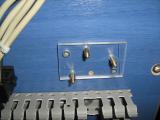
Now that i have the base for the switch, i will mount this base onto the PC box. The USB switch will be then fixed onto the base...
 |
 |
 |
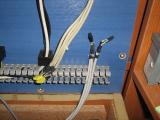
| Inside the PC box there are these USB wires |
I fixed the base between these wires |
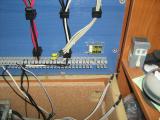
This is how it looks... |
The USB wires with the black connectors come from the motherboard USB connectors. The cables with the yellow connectors are for the USB ports where the keyboard/mouse and the other peripherals are connected to. This is how the wires are connected:
And this is how the relay connector and the ADG714 interface wires are connected. Notice that the ferrite is inside the wire canal:
Power for the Smartcard Reader board
Until now, i provided the 5V supply for the PIC and the smart-cards, from the PICKIT ICSP wire. But now i have to find a reasonable way to provide this 5V supply. I did not want to get power from the 4 ports. Since my motherboard has some 12 USB ports, i decided to use one for providing these 5V...
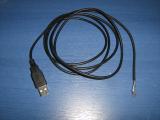 |
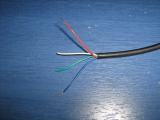 |
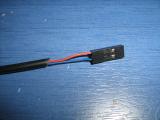 |
| I found somewhere in my drawers this USb wire with one USB connector... Perfect! |
These are the wires from the USB cable |
I only need these two... |
Nothing left to do... Only to connect the switch interface wire, the relay wire and the power wire to the smartcard reader board...
Everything works just fine!!! One last step... Make a nice slot for the smartcard...
Comments
At 25 October 2015, 7:00:24 user Giorgos Lazaridis wrote: [reply @ Giorgos Lazaridis]@Oliver I found this one on ebay
At 22 October 2015, 15:06:45 user Oliver wrote: [reply @ Oliver]Hi,
Where can I buy a smartcard slot? (the one you solder on the PCB)
Regards,
Oliver
At 20 August 2015, 22:08:48 user Giorgos Lazaridis wrote: [reply @ Giorgos Lazaridis]@doug No i do not have them as commercial units. But I do design commercial products for customers. If you wish you can contact me by email and discuss your needs.
At 20 August 2015, 17:39:11 user doug wrote: [reply @ doug]Giorgos, That is great. Are you or anyone commercializing these at all? I would buy 50 right now for a specialized facility I have but not sure I want to build that many myself.....
At 19 August 2015, 21:25:40 user Giorgos Lazaridis wrote: [reply @ Giorgos Lazaridis]@Piyush Pandey I use the photographic transfer method.
At 11 August 2015, 12:01:12 user Piyush Pandey wrote: [reply @ Piyush Pandey]This is a very cool project of yours and I must admit that its a very well documented as well with snapshots wherever required.
But Giorgos I want to know that what is the procedure you followed in making the
PCB as I am greatly impressed the print and cleanliness of the PCB.
At 21 October 2012, 4:54:26 user PCB Assembly wrote: [reply @ PCB Assembly]This was one of the most well documented blog entries I have read in a long time. It was a pleasure to fill all the gaps I had about this topic. Well written an concise.
At 3 September 2012, 21:14:58 user pcb wrote: [reply @ pcb]Thanks for share this pcb layout design work... its give me more better ideas for my future projects...
At 3 September 2012, 21:04:29 user Thanassis Mavrogeorgiadis wrote: [reply @ Thanassis Mavrogeorgiadis]Very good project. Well done George!
At 14 August 2012, 20:56:06 user Giorgos Lazaridis wrote: [reply @ Giorgos Lazaridis]@Pat I see what you mean... I think i will make some tests :D
At 14 August 2012, 20:09:12 user Pat wrote: [reply @ Pat]@Giorgos Lazaridis Yeah, like I said, it'll work... mostly. If you take a look at TPC 12 on the ADG714 datasheet, the frequency response at ~500 MHz is going to be around -8 dB. The maximum attenuation of a USB cable is basically the same as that ( http://www.usb.org/developers/presentations/pres0410/2-2_SSUSB_DevCon_PHY_Heck.pdf ) - so essentially, you've basically just put in a long USB cable.
So long as you're talking about devices that are attached with, say, like a 1' cable or something like that, you won't notice basically anything. It's all just a question of how much margin you have left.
At 14 August 2012, 19:48:27 user Giorgos Lazaridis wrote: [reply @ Giorgos Lazaridis]@Pat this was one of my concerned, it works ok until now, and i have test usb devices like external HDD (which i copied some 300GB of data with no problem) and also my camcorder uses the USB for the video. Nevertheless, have order relays with 4p2t if the adg fails or have slow data transmission.
At 14 August 2012, 18:23:49 user playfsx wrote: [reply @ playfsx]molis eida smartcard lock skeytika oti enas apo ellinas eixe kanei kati paromio me tilekartes kai tsoup na se pali :P ! ekseretiki douleia opws panta !
At 14 August 2012, 14:39:43 user Pat wrote: [reply @ Pat]"I'm not sure if the ADG714 can be used for USB applications."
No, it can't. It's the bandwidth that matters, not the on-resistance. It has a bandwidth of 155 MHz, which is way below USB spec. This is because the ADG714's input/output capacitance isn't 6/4 pF: I'm not sure where you got that from (the digital input/output capacitance is 3/4 pF respectively). Its on capacitance is *22* pF. This is way, way too high: on a 50 ohm input that's a critical frequency of ~150 MHz.
Switches designed for USB (like the FSUSB46) have on capacitances more like 4 pF, leading to a bandwidth of well greater than 480 MHz.
This design will work... some of the time. Probably mainly with short USB cables and devices that are well within USB spec. Definitely with low-speed USB devices. But high-speed USB devices could easily struggle since you're probably tacking on at least ~6 dB of attenuation.
At 4 July 2012, 8:01:53 user George Karkalis wrote: [reply @ George Karkalis]Nice app,useful and educational if I may say so! |
|
 HOT in heaven! HOT in heaven!

|
|




 Home
Home
 Projects
 Experiments
 Circuits
 Theory
 BLOG
BLOG
 PIC Tutorials
 Time for Science

 Contact
 Forum
Forum
 RSS
RSS



 Reddit this
 NEW in heaven!